Tablets an Schulen Neu
Space shortcuts
Space Tools
Tablets an Schulen Neu TSN

Versions Compared

Key

  • This line was added.
  • This line was removed.
  • Formatting was changed.
Page properties
hiddentrue


InhaltEine Anleitung zum Löschen aller Inhalte und Einstellungen bei Schulwechsel
Version1
Status

Status
colourGreen
titleaktiv


Aura - Button
elevationflat
outlinedregular
borderRadius8
color{"light":"#FFFFFF","dark":"#FFFFFF"}
sizemedium
background{"light":"#007bbd"}
iconfaArrowLeft
iconPositionleft
hrefTypepage
href163120151
labelZurück
alignmentleft

Aura - Background Content
backgroundImageHrefTypeattachment
padding40
backgroundImageHref163120851
containerMinHeight250
backgroundSizecontain
contentPositionflex-end
backgroundPositioncenter center


Aura - Title
color{"light":"#363636"}
textAligncenter
fontSize32
lineHeight48
cloudTextDemo Title
tagh1
fontWeightnormal
Alle Inhalte und Einstellungen löschen


Aura - Panel
tab1
styles{"base":{"backgroundColor":{"color":"var(--aui-body-background)"},"border":{"color":{"light":"#007bbd"},"width":4,"top":false,"right":false,"bottom":false,"left":true,"style":"solid"},"borderRadius":{"radius":8},"boxShadow":{"shadows":[{"color":"rgba(0, 0, 0, 0.08)","x":0,"y":1,"blur":1,"spread":0},{"color":"rgba(0, 0, 0, 0.16)","x":0,"y":1,"blur":3,"spread":1}]}},"body":{"text":{"fontSize":14,"color":{"light":"#363636"},"fontWeight":"normal","textAlign":"left"}},"header":{"icon":{"name":"faInfoCircle","color":{"light":"#007bbd"},"size":18}},"headline":{"text":{"text":"Info","color":"var(--ds-text)","fontSize":18,"fontWeight":"bold","textAlign":"left"}}}

In diesem Artikel wird Ihnen Beschrieben, wie Sie

Ihr Gerät auf Werkseinstellungen zurücksetzen

alle Inhalte und Einstellungen auf Ihrem iPad löschen können.

Aura - Divider
serializedStyles{"alignment":{"horizontal":"start"},"icon":{"name":"faPaperPlane","color":"#333","size":24},"text":{"color":"#333","fontSize":14,"textAlign":"left","fontWeight":"bold","text":"Aura Divider"},"border":{"top":false,"right":false,"bottom":true,"left":false,"color":{"light":"#b6c2cf"},"style":"solid","width":1},"size":{}}
typeregular

Aura - Panel
tab0
styles{"body":{"text":{"fontSize":14,"color":{"light":"#363636"},"textAlign":"left","fontWeight":"normal"}},"header":{},"headline":{"alignment":{"horizontal":"start"}},"base":{"boxShadow":{"shadows":[{"color":"rgba(0, 0, 0, 0.08)","x":0,"y":1,"blur":1,"spread":0},{"color":"rgba(0, 0, 0, 0.16)","x":0,"y":1,"blur":3,"spread":1}]},"borderRadius":{"radius":8},"backgroundColor":{"color":{"light":"#f2f2f2"}},"border":{"color":{"light":"#c1c1c1"},"style":"solid","width":2,"bottom":true,"top":false,"left":false,"right":false},"size":{}}}

  Schritt 1:

Expand
titleEin-/Ausklappen

Versichern Sie sich das alle in Ihre Daten in der iCloud gesichert sind

.

Aura - Panel
tab0
styles{"body":{"text":{"fontSize":14,"color":{"light":"#363636"},"textAlign":"left","fontWeight":"normal"}},"header":{},"headline":{"alignment":{"horizontal":"start"}},"base":{"boxShadow":{"shadows":[{"color":"rgba(0, 0, 0, 0.08)","x":0,"y":1,"blur":1,"spread":0},{"color":"rgba(0, 0, 0, 0.16)","x":0,"y":1,"blur":3,"spread":1}]},"borderRadius":{"radius":8},"backgroundColor":{"color":{"light":"#f2f2f2"}},"border":{"color":{"light":"#c1c1c1"},"style":"solid","width":2,"bottom":true,"top":false,"left":false,"right":false},"size":{}}}

  Schritt 2:

Expand
titleEin-/Ausklappen

Gehen

gehen

Sie in die Einstellungen des Gerätes.

Image Modified

Aura - Panel
tab0
styles{"body":{"text":{"fontSize":14,"color":{"light":"#363636"},"textAlign":"left","fontWeight":"normal"}},"header":{},"headline":{"alignment":{"horizontal":"start"}},"base":{"boxShadow":{"shadows":[{"color":"rgba(0, 0, 0, 0.08)","x":0,"y":1,"blur":1,"spread":0},{"color":"rgba(0, 0, 0, 0.16)","x":0,"y":1,"blur":3,"spread":1}]},"borderRadius":{"radius":8},"backgroundColor":{"color":{"light":"#f2f2f2"}},"border":{"color":{"light":"#c1c1c1"},"style":"solid","width":2,"bottom":true,"top":false,"left":false,"right":false},"size":{}}}

  Schritt 3:

Expand
titleEin-/Ausklappen

Öffnen

öffnen

Sie den Reiter "Allgemein".

Image Modified

Aura - Panel
tab0
styles{"body":{"text":{"fontSize":14,"color":{"light":"#363636"},"textAlign":"left","fontWeight":"normal"}},"header":{},"headline":{"alignment":{"horizontal":"start"}},"base":{"boxShadow":{"shadows":[{"color":"rgba(0, 0, 0, 0.08)","x":0,"y":1,"blur":1,"spread":0},{"color":"rgba(0, 0, 0, 0.16)","x":0,"y":1,"blur":3,"spread":1}]},"borderRadius":{"radius":8},"backgroundColor":{"color":{"light":"#f2f2f2"}},"border":{"color":{"light":"#c1c1c1"},"style":"solid","width":2,"bottom":true,"top":false,"left":false,"right":false},"size":{}}}

  Schritt 4:

Expand
titleEin-/Ausklappen

Drücken

drücken

Sie "iPad übertragen/zurücksetzten".

Image Modified


Aura - Panel
tab0
styles{"body":{"text":{"fontSize":14,"color":{"light":"#363636"},"textAlign":"left","fontWeight":"normal"}},"header":{},"headline":{"alignment":{"horizontal":"start"}},"base":{"boxShadow":{"shadows":[{"color":"rgba(0, 0, 0, 0.08)","x":0,"y":1,"blur":1,"spread":0},{"color":"rgba(0, 0, 0, 0.16)","x":0,"y":1,"blur":3,"spread":1}]},"borderRadius":{"radius":8},"backgroundColor":{"color":{"light":"#f2f2f2"}},"border":{"color":{"light":"#c1c1c1"},"style":"solid","width":2,"bottom":true,"top":false,"left":false,"right":false},"size":{}}}

  Schritt 5:

Expand
titleEin-/Ausklappen

Als

als

nächstes wählen Sie "Alle Inhalte und Einstellungen Löschen".

Image Modified


Aura - Panel
tab0
styles{"body":{"text":{"fontSize":14,"color":{"light":"#363636"},"textAlign":"left","fontWeight":"normal"}},"header":{},"headline":{"alignment":{"horizontal":"start"}},"base":{"boxShadow":{"shadows":[{"color":"rgba(0, 0, 0, 0.08)","x":0,"y":1,"blur":1,"spread":0},{"color":"rgba(0, 0, 0, 0.16)","x":0,"y":1,"blur":3,"spread":1}]},"borderRadius":{"radius":8},"backgroundColor":{"color":{"light":"#f2f2f2"}},"border":{"color":{"light":"#c1c1c1"},"style":"solid","width":2,"bottom":true,"top":false,"left":false,"right":false},"size":{}}}

  Schritt 6:

Expand
titleEin-/Ausklappen

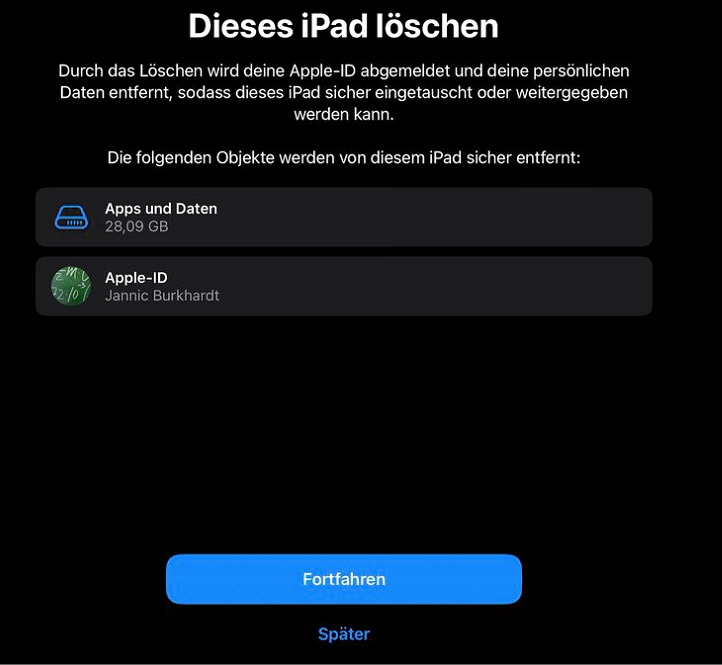
Nun

nun

werden Sie darüber Informiert was gelöscht und abgemeldet wird (hier drücken Sie Fortfahren).

Image Modified

Aura - Panel
tab0
styles{"body":{"text":{"fontSize":14,"color":{"light":"#363636"},"textAlign":"left","fontWeight":"normal"}},"header":{},"headline":{"alignment":{"horizontal":"start"}},"base":{"boxShadow":{"shadows":[{"color":"rgba(0, 0, 0, 0.08)","x":0,"y":1,"blur":1,"spread":0},{"color":"rgba(0, 0, 0, 0.16)","x":0,"y":1,"blur":3,"spread":1}]},"borderRadius":{"radius":8},"backgroundColor":{"color":{"light":"#f2f2f2"}},"border":{"color":{"light":"#c1c1c1"},"style":"solid","width":2,"bottom":true,"top":false,"left":false,"right":false},"size":{}}}

  Schritt 7:

Expand
titleEin-/Ausklappen

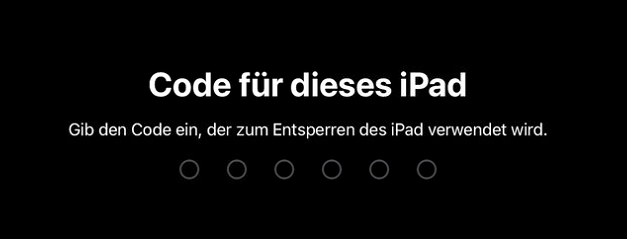
Nun

                                                                                                                                                                                                                                                                                                                                                                                                                                                                  nun

müssen Sie zur Bestätigung den Code Ihres iPads

eingeben Image Removed                                                                                                                                                                                                                                                                                                                                                                                       

eingeben. 

Image Added

Aura - Panel
tab0
styles{"body":{"text":{"fontSize":14,"color":{"light":"#363636"},"textAlign":"left","fontWeight":"normal"}},"header":{},"headline":{"alignment":{"horizontal":"start"}},"base":{"boxShadow":{"shadows":[{"color":"rgba(0, 0, 0, 0.08)","x":0,"y":1,"blur":1,"spread":0},{"color":"rgba(0, 0, 0, 0.16)","x":0,"y":1,"blur":3,"spread":1}]},"borderRadius":{"radius":8},"backgroundColor":{"color":{"light":"#f2f2f2"}},"border":{"color":{"light":"#c1c1c1"},"style":"solid","width":2,"bottom":true,"top":false,"left":false,"right":false},"size":{}}}

  Schritt 8:

Expand
titleEin-/Ausklappen

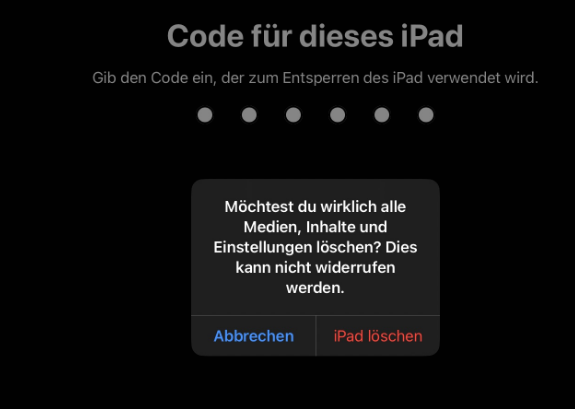
Im

im

Letzten schritt werden Sie ein letztes mal gefragt ob das iPad zurück gesetzt werden soll, hier wählen Sie "iPad löschen".

Image Modified

Aura - Divider
serializedStyles{"alignment":{"horizontal":"start"},"icon":{"name":"faPaperPlane","color":"#333","size":24},"text":{"color":"#333","fontSize":14,"textAlign":"left","fontWeight":"bold","text":"Aura Divider"},"border":{"top":false,"right":false,"bottom":true,"left":false,"color":{"light":"#b6c2cf"},"style":"solid","width":1},"size":{}}
typeregular

Aura - Panel
tab1
styles{"base":{"backgroundColor":{"color":"var(--aui-body-background)"},"border":{"color":{"light":"#007bbd"},"width":4,"top":false,"right":false,"bottom":false,"left":true,"style":"solid"},"borderRadius":{"radius":8},"boxShadow":{"shadows":[{"color":"rgba(0, 0, 0, 0.08)","x":0,"y":1,"blur":1,"spread":0},{"color":"rgba(0, 0, 0, 0.16)","x":0,"y":1,"blur":3,"spread":1}]}},"body":{"text":{"fontSize":14,"color":{"light":"#363636"},"fontWeight":"normal","textAlign":"left"}},"header":{"icon":{"name":"faInfoCircle","color":{"light":"#007bbd"},"size":18}},"headline":{"text":{"text":"Info","color":"var(--ds-text)","fontSize":18,"fontWeight":"bold","textAlign":"left"}}}

Daraufhin wird sich Ihr iPad neu Starten, dies kann einige Minuten dauern.

In manchen fällen muss bevor das iPad gelöscht werden kann die Apple-ID abgemeldet werden.


Tablets an Schulen Neu TSN