Tablets an Schulen Neu
Space shortcuts
Space Tools
Tablets an Schulen Neu TSN

Versions Compared

Key

  • This line was added.
  • This line was removed.
  • Formatting was changed.
Page properties
hiddentrue
InhaltAnleitung für die DEP-Aufnahme bei Kauf über EDU Partner
Version1
Status

Status
colourGreen
titleaktiv

Panel
borderColor#006599
titleColor#FFFFFF
titleBGColor#007bbd
borderStylesolid
titleWeiterführende Informationen

LINK: https://kb.lra-sm.de/x/B4BrBg

LINK Portal: Anfrage erstellen ←  hier melden ausschließlich Ihr iPad zur Schulzuweisung bei uns an, das iPad muss zuvor durch Sie bei einem EDU Partner gekauft worden sein.

Aura - Panel
tab1
styles{"base":{"backgroundColor":{"color":"var(--aui-body-background)"},"border":{"color":{"light":"#007bbd"},"width":4,"top":false,"right":false,"bottom":false,"left":true,"style":"solid"},"borderRadius":{"radius":8},"boxShadow":{"shadows":[{"color":"rgba(0, 0, 0, 0.08)","x":0,"y":1,"blur":1,"spread":0},{"color":"rgba(0, 0, 0, 0.16)","x":0,"y":1,"blur":3,"spread":1}]}},"body":{"text":{"fontSize":14,"color":{"light":"#363636"},"fontWeight":"normal","textAlign":"left"}},"header":{"icon":{"name":"faInfoCircle","color":{"light":"#007bbd"},"size":18}},"headline":{"text":{"text":"Info","color":"var(--ds-text)","fontSize":18,"fontWeight":"bold","textAlign":"left"}}}

Sie melden uns über oben genannte Links nach dem Kauf die Seriennummer ihres iPads, wir weisen ihr iPad der entsprechenden Schule in unserem System zu.

LINK bereits gelisteter Partner: EDU-Partner

Aura - Divider
serializedStyles{"alignment":{"horizontal":"start"},"icon":{"name":"faPaperPlane","color":"#333","size":24},"text":{"color":"#333","fontSize":14,"textAlign":"left","fontWeight":"bold","text":"Aura Divider"},"border":{"top":false,"right":false,"bottom":true,"left":false,"color":{"light":"#b6c2cf"},"style":"solid","width":1},"size":{}}
typeregular

Aura - Panel
tab1
styles{"body":{},"header":{},"headline":{},"base":{"boxShadow":{"shadows":[{"color":"rgba(0, 0, 0, 0.08)","x":0,"y":1,"blur":1,"spread":0},{"color":"rgba(0, 0, 0, 0.16)","x":0,"y":1,"blur":3,"spread":1}]},"borderRadius":{"radius":4},"backgroundColor":{"color":{"light":"#f2f2f2"}}}}

Schritt 1:

Um Zugang zum Ticketportal für Schulen zu erhalten, öffnen Sie bitte den folgenden Link:  https://deinrz.de/schule

Aura - Panel
tab1
styles{"body":{},"header":{},"headline":{},"base":{"boxShadow":{"shadows":[{"color":"rgba(0, 0, 0, 0.08)","x":0,"y":1,"blur":1,"spread":0},{"color":"rgba(0, 0, 0, 0.16)","x":0,"y":1,"blur":3,"spread":1}]},"borderRadius":{"radius":4},"backgroundColor":{"color":{"light":"#f2f2f2"}}}}

Schritt 2

.

:

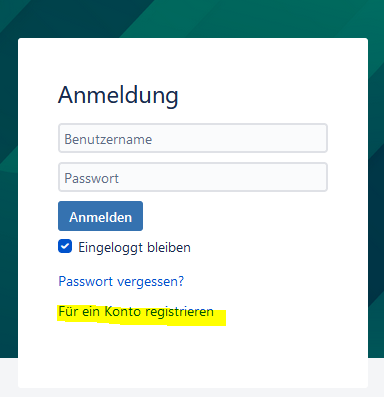
Falls Sie noch kein Konto haben, müssen Sie sich zunächst registrieren. Klicken Sie hierzu auf "Für ein Konto registrieren"

Image Modified

Aura - Panel
tab1
styles{"body":{},"header":{},"headline":{},"base":{"boxShadow":{"shadows":[{"color":"rgba(0, 0, 0, 0.08)","x":0,"y":1,"blur":1,"spread":0},{"color":"rgba(0, 0, 0, 0.16)","x":0,"y":1,"blur":3,"spread":1}]},"borderRadius":{"radius":4},"backgroundColor":{"color":{"light":"#f2f2f2"}}}}

Schritt 3

.

:

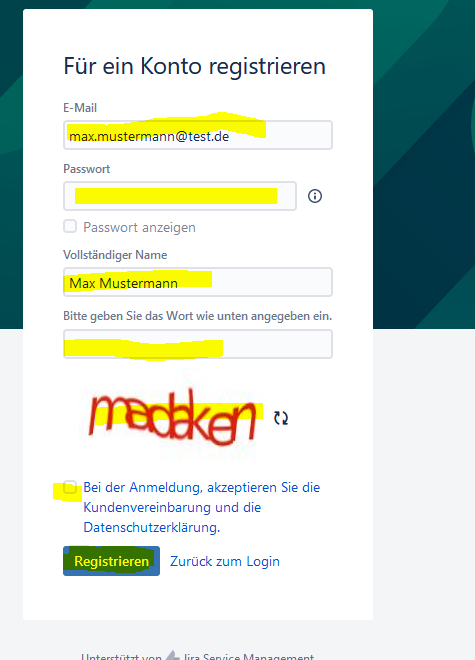
Geben Sie Ihre Daten ein, einschließlich E-Mail-Adresse, Name, selbst erstelltes Passwort und Captcha-Wort. Stellen Sie sicher, dass Sie das Kästchen "Bei der Anmeldung akzeptieren..." anklicken, bevor Sie auf "Registrieren" klicken.

Image Modified

Aura - Panel
tab1
4.
styles{"body":{},"header":{},"headline":{},"base":{"boxShadow":{"shadows":[{"color":"rgba(0, 0, 0, 0.08)","x":0,"y":1,"blur":1,"spread":0},{"color":"rgba(0, 0, 0, 0.16)","x":0,"y":1,"blur":3,"spread":1}]},"borderRadius":{"radius":4},"backgroundColor":{"color":{"light":"#f2f2f2"}}}}

Schritt 4:

Nach erfolgreicher Registrierung erhalten sie von ticket@lra-sm.de eine Bestätigungsmail, dass ihr Konto angelegt wurde.

Aura - Panel
tab1
styles{"body":{},"header":{},"headline":{},"base":{"boxShadow":{"shadows":[{"color":"rgba(0, 0, 0, 0.08)","x":0,"y":1,"blur":1,"spread":0},{"color":"rgba(0, 0, 0, 0.16)","x":0,"y":1,"blur":3,"spread":1}]},"borderRadius":{"radius":4},"backgroundColor":{"color":{"light":"#f2f2f2"}}}}

Schritt 5

.

:

Jetzt können Sie erneut auf den oben genannten

Link  

Link https://deinrz.de/schule zugreifen und sich gegebenenfalls anmelden.


6.
Aura - Panel
tab1
styles{"body":{},"header":{},"headline":{},"base":{"boxShadow":{"shadows":[{"color":"rgba(0, 0, 0, 0.08)","x":0,"y":1,"blur":1,"spread":0},{"color":"rgba(0, 0, 0, 0.16)","x":0,"y":1,"blur":3,"spread":1}]},"borderRadius":{"radius":4},"backgroundColor":{"color":{"light":"#f2f2f2"}}}}

Schritt 6:

Sie werden dann automatisch auf das Ticketportal weitergeleitet.

Aura - Panel
7.
tab1
styles{"body":{},"header":{},"headline":{},"base":{"boxShadow":{"shadows":[{"color":"rgba(0, 0, 0, 0.08)","x":0,"y":1,"blur":1,"spread":0},{"color":"rgba(0, 0, 0, 0.16)","x":0,"y":1,"blur":3,"spread":1}]},"borderRadius":{"radius":4},"backgroundColor":{"color":{"light":"#f2f2f2"}}}}

Schritt 7:

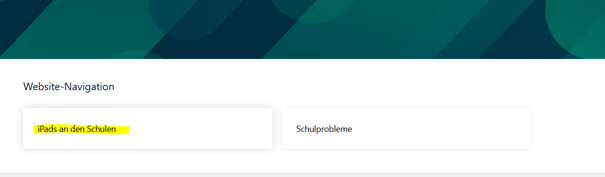
Wählen Sie in der Website-Navigation den Punkt "iPads an Schulen" aus.

Image Modified

Aura - Panel
8.
tab1
styles{"body":{},"header":{},"headline":{},"base":{"boxShadow":{"shadows":[{"color":"rgba(0, 0, 0, 0.08)","x":0,"y":1,"blur":1,"spread":0},{"color":"rgba(0, 0, 0, 0.16)","x":0,"y":1,"blur":3,"spread":1}]},"borderRadius":{"radius":4},"backgroundColor":{"color":{"light":"#f2f2f2"}}}}

Schritt 8:

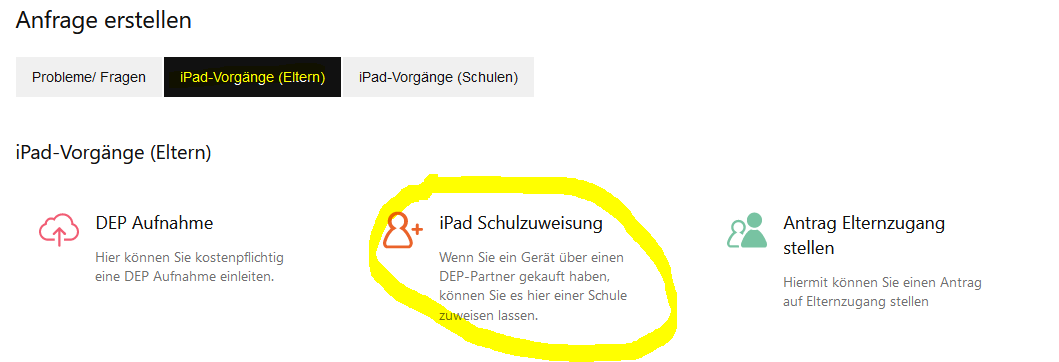
Klicken Sie dann auf "iPad-Vorgänge (Eltern)" und anschließend auf "iPad Schulzuweisung".

 Image Removed

Image Added

9.
Aura - Panel
tab1
styles{"body":{},"header":{},"headline":{},"base":{"boxShadow":{"shadows":[{"color":"rgba(0, 0, 0, 0.08)","x":0,"y":1,"blur":1,"spread":0},{"color":"rgba(0, 0, 0, 0.16)","x":0,"y":1,"blur":3,"spread":1}]},"borderRadius":{"radius":4},"backgroundColor":{"color":{"light":"#f2f2f2"}}}}

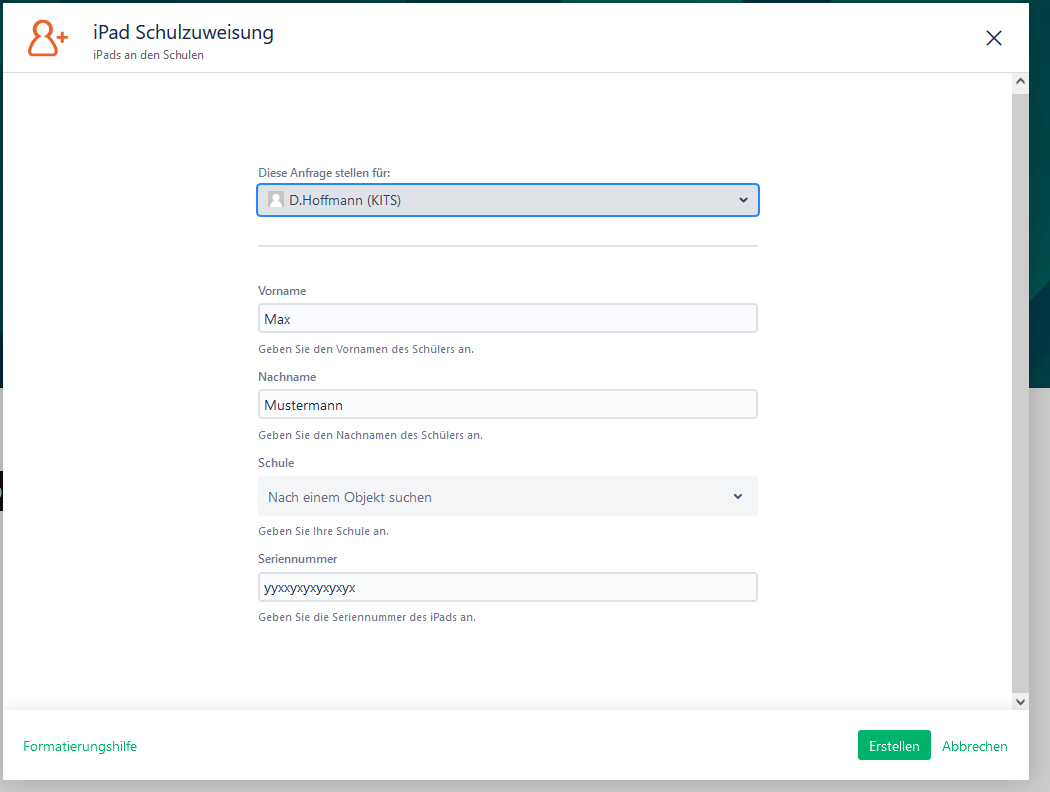
Schritt 9:

Nun öffnet sich das Formular für die DEP Aufnahme.

Aura - Panel
tab1
styles{"body":{},"header":{},"headline":{},"base":{"boxShadow":{"shadows":[{"color":"rgba(0, 0, 0, 0.08)","x":0,"y":1,"blur":1,"spread":0},{"color":"rgba(0, 0, 0, 0.16)","x":0,"y":1,"blur":3,"spread":1}]},"borderRadius":{"radius":4},"backgroundColor":{"color":{"light":"#f2f2f2"}}}}

Schritt 10

.

:

Bitte tragen Sie hier die Daten ihrers Kindes und die Seriennummer des iPad ein.

 Image Removed

Image Added 

11. 
Aura - Panel
tab1
styles{"body":{},"header":{},"headline":{},"base":{"boxShadow":{"shadows":[{"color":"rgba(0, 0, 0, 0.08)","x":0,"y":1,"blur":1,"spread":0},{"color":"rgba(0, 0, 0, 0.16)","x":0,"y":1,"blur":3,"spread":1}]},"borderRadius":{"radius":4},"backgroundColor":{"color":{"light":"#f2f2f2"}}}}

Schritt 11:

Wenn Sie das Formular vollständig ausgefüllt haben, klicken Sie auf "Erstellen", um es abzuschicken. 

Aura - Divider
serializedStyles{"alignment":{"horizontal":"start"},"icon":{"name":"faPaperPlane","color":"#333","size":24},"text":{"color":"#333","fontSize":14,"textAlign":"left","fontWeight":"bold","text":"Aura Divider"},"border":{"top":false,"right":false,"bottom":true,"left":false,"color":{"light":"#b6c2cf"},"style":"solid","width":1},"size":{}}
typeregular

Aura - Panel
tab1
styles{"body":{},"header":{},"headline":{},"base":{"boxShadow":{"shadows":[{"color":"rgba(0, 0, 0, 0.08)","x":0,"y":1,"blur":1,"spread":0},{"color":"rgba(0, 0, 0, 0.16)","x":0,"y":1,"blur":3,"spread":1}]},"borderRadius":{"radius":4},"backgroundColor":{"color":{"light":"#f2f2f2"}}}}

Wie geht es weiter? Sie erhalten von uns nach Erstellung des Vorgangs eine E-Mail mit weiterführenden Informationen und Anweisungen.


Tablets an Schulen Neu TSN